Wear OS tile
one tap, habit logged
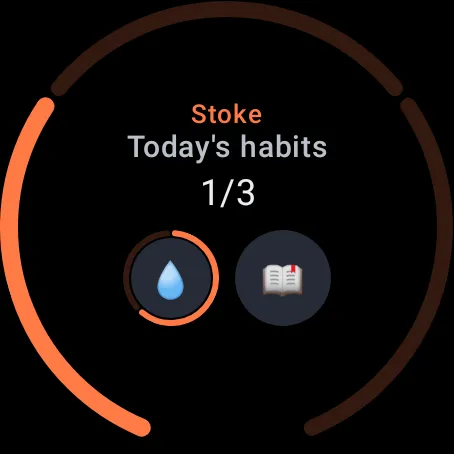
Today's progress as a ring, with a button for each habit left to do.
Swipe to the tile and tap a habit's button to log it, without opening the app. Amounts, like 8 glasses of water, get a small ring of their own, and arrows page through the rest when there are more habits than fit.
The watch app
today's list, on your wrist
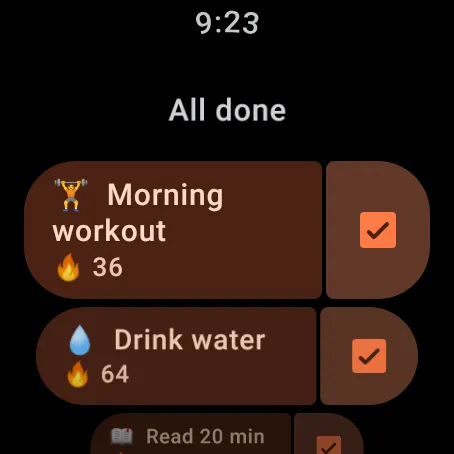
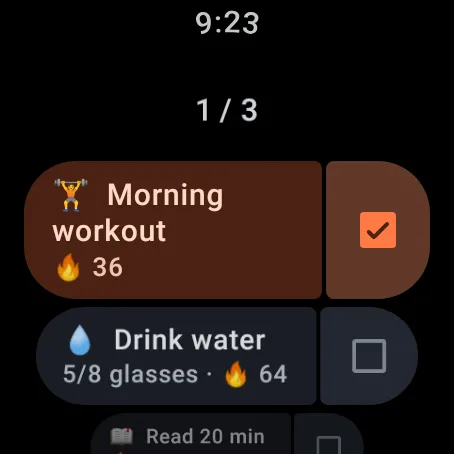
Tick a habit off with a tap.
The watch app shows today's habits with their streaks. A tap ticks a habit off, or adds a step to an amount, like one more glass of water.
Habit details on the watch
every streak, at a glance
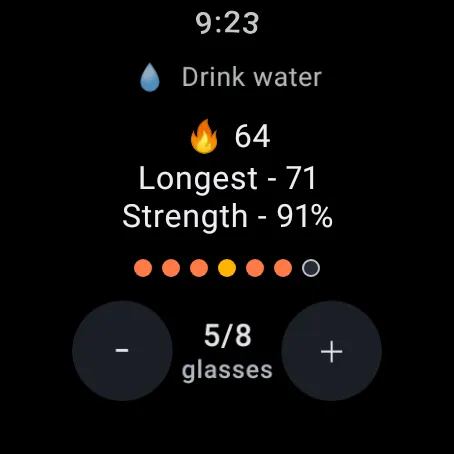
Streak, record and strength for each habit.
Open a habit to see its current streak, its longest streak, its strength and the last seven days as dots. An amount has minus and plus buttons, so you can fix a count without reaching for the phone.
More on the watch
made for your wrist
A ring on your watch face Premium
Add a ring to your watch face that shows the same progress as the tile. It shows how the day is going; habits are ticked on the tile or in the app.
Habits that fill themselves in Premium
Health Connect is where Android keeps what your watch records. Link a habit to it, and "Go for a run" ticks off when your watch records a run, "Walk 8,000 steps" fills in from your step count, and "Sleep 8 hours" counts last night's sleep.
In sync with your phone
Habits are created and edited in the phone app. The watch shows and ticks them, works offline and stays in sync with your phone.
Which watches
Any watch on Wear OS 3 or later, including the Galaxy Watch 4 and newer and the Pixel Watch.
part of premium
The watch app, the tile and the watch-face ring come with Premium, a one-time purchase, not a subscription. Every new install gets 14 days with every feature, the watch included.
Tracking on the phone stays free after the trial.